
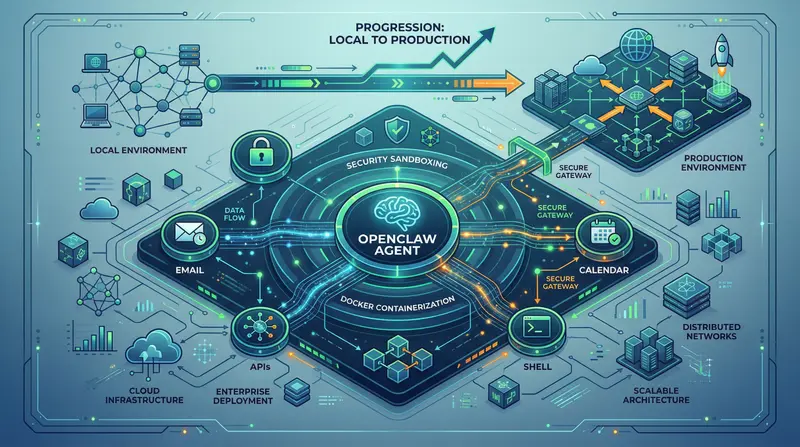
Openclaw in production: Secure enterprise deployment
Comprehensive guide to deploying Openclaw: Docker setup, ambient authority, security checklist. Deploy AI agents securely without risks. Read →

Vit Safarik
AI & business productivity
Openclaw has over 215,000 stars on GitHub, OpenAI acquired it, and every other tech lead asks if they should deploy it. But between “running locally” and “putting it into production in a company” is a chasm full of security holes. This article is about bridging that gap.
Openclaw is not a chatbot. An autonomous agent has different security rules.
ChatGPT answers. Openclaw acts.
Specifically: Openclaw is an autonomous agent runtime built on TypeScript with an MIT license. You can give it access to:
- Calendar
- Internal APIs
- Shell
And it completes tasks on its own, without waiting for your command. Email triage, report generation, onboarding – this works in practice.
But precisely because Openclaw takes action (instead of just talking), different security logic applies.
An agent with access to your systems isn’t just a chatbot in disguise – it’s an autonomous process with identity and permissions. And that’s where the first pitfall begins.
Architecture and prerequisites: what you need to start
Openclaw runs as a TypeScript Node.js process. Checklist:
- Node.js 20+ (LTS, not experimental branch)
- Docker – the cleanest way to isolate in production
- API key for your chosen LLM backend (OpenAI, Anthropic, or self-hosted)
- Minimum specs: 2 vCPU, 4 GB RAM (less = problems with parallel tasks)
We recommend starting with Docker even locally:
- You get closer to production reality
- Container isolation protects you from an agent that starts doing things outside the sandbox
Deploying Openclaw: DigitalOcean vs. your own infrastructure
DigitalOcean: the fastest path (1-click deploy)
DigitalOcean offers a pre-configured deployment for Openclaw on a Droplet Basic (2 vCPU / 4 GB RAM). Setup takes less than 20 minutes.
# Basic Docker setup – your own infrastructure
docker pull openclaw/runtime:latest

docker run -d \
  --name openclaw-agent \
  --restart unless-stopped \
  -e OPENAI_API_KEY=sk-... \
  -e OPENCLAW_WORKSPACE=/workspace \
  -v $(pwd)/workspace:/workspace \
  --memory="3g" \
  --cpus="1.5" \
  openclaw/runtime:latest
When to choose DigitalOcean:
- MVP and proof-of-concept
- Internal tools
- Quick start without worrying about infrastructure
Your own infrastructure: Docker Compose and Kubernetes
If your company has on-premise requirements (GDPR, data residency, policy), you go the route of your own Kubernetes cluster or Docker Compose. Openclaw’s MIT license means: no telemetry, no cloud callbacks.
# docker-compose.yml – production foundation
services:
  openclaw:
    image: openclaw/runtime:latest
    environment:
      - NODE_ENV=production
      - OPENCLAW_LOG_LEVEL=info
    volumes:
      - ./workspace:/workspace:rw
      - ./config:/config:ro
    mem_limit: 3g
    cpus: 1.5
    restart: unless-stopped
    networks:
      - internal
Security pitfall #1: ambient authority and how to solve it
This is the biggest security problem that most articles ignore.
What is ambient authority and why it can destroy you
Ambient authority means: the agent automatically inherits all permissions of the environment it runs in.
Example: You deploy an agent for email triage. The agent correctly sorts emails. Then it receives prompt injection through an incoming email from an attacker and:
- Forwards sensitive correspondence to an external address
- With no record
- With no alert
Result: ZeroLeaks audit (February 2026) gives Openclaw’s default configuration a score of 2/100 and 91% success rate for prompt injection attacks.
Default settings = production is not acceptable.
Crittora: cryptographic policy layer
Crittora solves ambient authority by adding a least-privilege model – every action by the agent is validated against a cryptographically signed policy.
Specifically:
- The agent gets only explicitly allowed scopes (read emails with tag
triage, not all) - Every action leaves an auditable record
- Policy changes centrally without restarting the agent
Crittora isn’t the only path, but ambient authority needs to be addressed every time:
- Your own proxy layer
- OAuth scope management
- Or exactly Crittora
Leaving it on default settings = unacceptable risk.
Production checklist: what must be done before go-live
Go through this checklist before exposing the agent to real data.
Identity & access: RBAC, SSO, scopes
- RBAC configured – agent doesn’t have admin access to anything it doesn’t need
- SSO integration – agent authenticates through Okta, Azure AD (not static API keys)
- Separate service account for each agent (sharing credentials = antipattern)
- Scope minimization – OAuth scopes trimmed to minimum (read-only where sufficient)
Audit and monitoring: logs and alerting
- Structured logs – every agent action in JSON format (timestamp, user context, result)
- Centralized log aggregation – Datadog, Grafana Loki, or Elastic (logs can’t just be on the host)
- Alerting on anomalies – agent makes 100 API calls/hour instead of 10? You want to know immediately
- Retention policy – audit logs minimum 90 days, ideally 1 year (compliance)
Protection against prompt injection
- Input sanitization – user input doesn’t go directly into the system prompt
- Instruction hierarchy – system prompt takes precedence over user input
- Rate limiting – prevents escalation if compromised
- Canary instructions – hidden instructions signaling manipulation attempt
Network isolation: egress filtering and secrets
- Egress filtering – agent only calls whitelisted domains/IPs
- Internal network separation – agent doesn’t access the database directly (goes through API)
- Secrets management – API keys in Vault or cloud secrets (not in docker run)
Where Openclaw makes sense in production (and where it doesn’t)
Works:
- Email triage and communication automation
- Report generation from internal data
- Onboarding workflows
- Monitoring and alerting
Doesn’t work:
- Environments with high-security compliance (PCI-DSS, HIPAA without an additional layer)
- Situations requiring 100% auditability without an additional solution
- Critical systems without the possibility of human-in-the-loop
Openclaw is a powerful tool, but an autonomous agent in production requires the same discipline as database access. A security-conscious person on your team is not optional.
Deploying Openclaw? We’ll help you do it securely
If you have questions about security or want to know where the gaps are in your configuration, check out our AI agent services.
Want an individual audit of your environment? Try our AI audit – we’ll review your infrastructure and give you specific recommendations.
For specific deployment questions, contact us at kontakt.
Interested in the topic of AI security? Check out more articles in our blog.
Share this article
Found this article helpful? Share it with colleagues who might benefit.